IDCHAIN SDK
IDCHAIN SDK is a TypeScript-based library that helps developers (both backend and frontend) seamlessly interact with the IDCHAIN blockchain. It provides high-level utilities to manage Decentralized Identifiers (DIDs), handle Verifiable Credentials, define and store document schemas, and claim and manage Web3Names – all in compliance with W3C standards.
This SDK is designed for both Node.js and browser environments, enabling easy integration with decentralized applications (dApps), backends, and web platforms.
Features
-
DID Management: Create, resolve, update, and delete DIDs with full key support (authentication, key agreement, assertion, capability delegation).
-
Verifiable Credentials (VCs): Issue, revoke, un-revoke, and verify credentials with W3C-compliant data models.
-
UID Document Schema: Define and store reusable schemas for standardized credential issuance.
-
Credential Verification: Verify both credentials and presentations, including selective disclosure (partial claim sharing).
-
Web3Names: Claim, resolve, and release human-readable names linked to DIDs.
-
Cross-Platform: Compatible with both backend (Node.js) and frontend (browser) environments.
Installation
This SDK is currently for internal use only (not published to npm). To include it in your project:
- Add this line to your
package.json
"@idchain-sdk": "github:idchain-sdk",
- Reinstall using your package manager
npm install
- Import the package in your code file
import { disconnect } from "@idchain-sdk";
Architecture
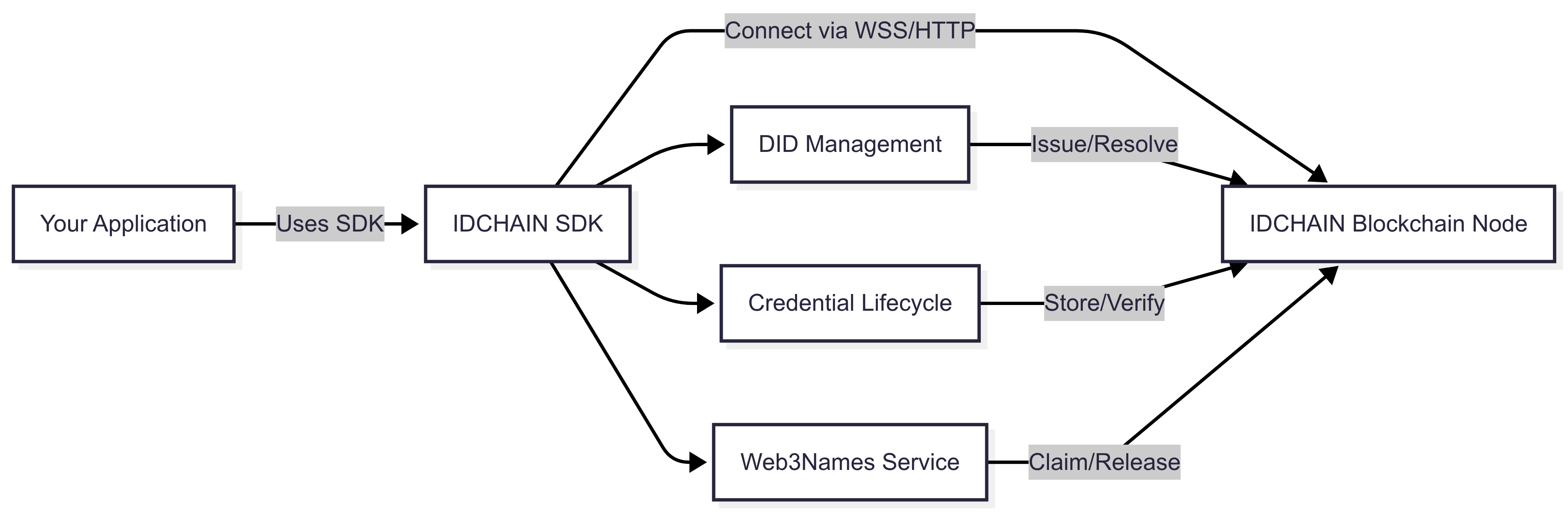
Below is a high-level overview of how the SDK interacts with IDCHAIN and your application:
Quick Start Example
Here’s a simple end-to-end example demonstrating how to use the SDK. This script connects to the blockchain, creates accounts, sets up DIDs, issues a credential, verifies it, and claims a Web3Name.
import dotenv from "dotenv";
import {
  connect,
  disconnect,
  AccountService,
  DidService,
  UidDocumentSchema,
  Credential,
  Verification,
  Web3Names,
  fromProperties,
  UidDocument,
  Uid,
} from "@idchain-sdk";

dotenv.config();

async function main() {
  await connect(process.env.WSS_ADDRESS as string);

  // Step 1: Create accounts for an Attester and a User (Claimer)
  const { mnemonic: attesterMnemonic, account: attester } =
    await AccountService.generateAccount();
  const { mnemonic: userMnemonic, account: user } =
    await AccountService.generateAccount();

  // Step 2: Create DIDs for both
  const attesterDid = await DidService.createDidAttester(
    attesterMnemonic,
    attester,
    async ({ data }) => ({
      keyType: "ed25519",
      signature: attester.sign(data),
    })
  );
  const userDidInfo = await DidService.createDidClaimer(
    userMnemonic,
    user,
    async ({ data }) => ({
      keyType: "ed25519",
      signature: user.sign(data),
    })
  );

  // Step 3: Define and store a UID Document Schema
  const schema = fromProperties(
    "KTP Schema",
    {
      NIK: { type: "string" },
      Name: { type: "string" },
      BirthDate: { type: "string" },
    },
    "V1"
  );

  await UidDocumentSchema.storeSchema(attester, attesterDid.uri, schema);

  // Step 4: Issue a Credential for the user
  const unsignedVc = await Credential.requestAttestation(
    userDidInfo.document.uri as Uid,
    schema,
    { NIK: "1234567890", Name: "Alice", BirthDate: "2000-01-01" },
    attesterDid.uri as Uid
  );
  const vc = await Credential.issueAttestation(
    unsignedVc,
    attesterDid as UidDocument,
    attester
  );

  // Step 5: Verify the Credential via Presentation
  const presentation = await Verification.setPresentation(
    vc,
    { uidDocument: userDidInfo.document as UidDocument, signers: [user] },
    new Date(Date.now() + 5 * 60 * 1000),
    { includeClaims: ["/NIK"], challenge: "random-challenge" }
  );
  const verificationResult = await Verification.verifyPresentation(
    presentation,
    {
      challenge: "random-challenge",
      now: new Date(),
    }
  );

  console.log("Verification Result:", verificationResult);

  // Step 6: Claim a Web3Name
  await Web3Names.claim(userDidInfo.document, user, "alice-id");

  // Disconnect
  await disconnect();
}

main().catch(console.error);
Modules Overview
The SDK is organized into six main modules, each with its own dedicated documentation:
- Account Service – Account generation & key management.
- DID Service – Create, resolve, update, and delete DIDs.
- UID Document Schema Service – Define and manage UID schemas.
- Credential Service – Issue, revoke, and manage credentials.
- Verification Service – Verify credentials & presentations.
- Web3Names Service – Claim, resolve, and release Web3Names.